Follow the actual navigation
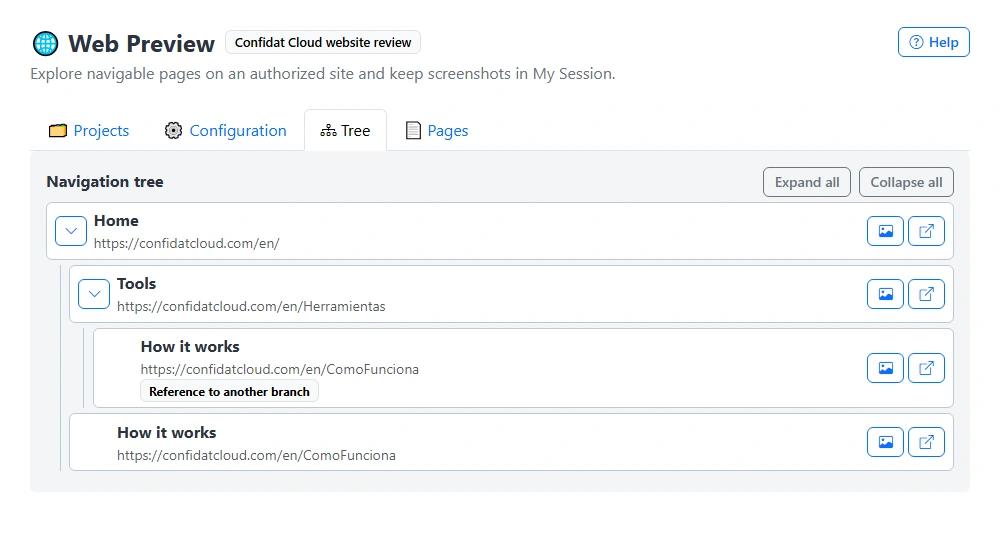
Expand branches to see which pages lead to each section. References show where multiple paths lead to the same destination.
 CLOUD
Web Preview
Capture navigable pages from authorised websites, explore their structure and save a visual reference for your next project.
Enter the HTTPS address and configure the capture options.
View the tree and the relationships between pages.
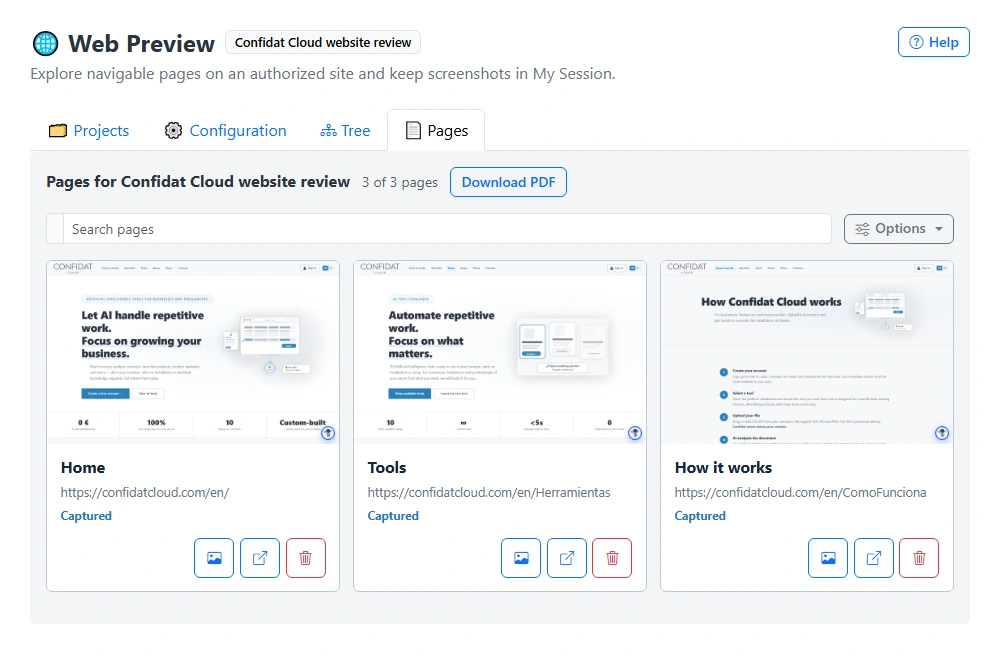
Browse the thumbnails and open each screenshot.
Save the project and download the screenshots.
Automatically capture pages within the configured limits, review thumbnails and export results to share.
Expand branches to see which pages lead to each section. References show where multiple paths lead to the same destination.
Thumbnails help you spot design differences across pages. Open a full-size screenshot or go back to the original URL to inspect a detail.
Review a client area or a staging site that uses a supported sign-in form. The credentials are used during the capture run.
Automate the capture of navigable pages.
Your projects and screenshots stay in your browser.
Credentials are used during capture and are not saved.
Adjust the options to suit your review.
For site owners, developers, designers and agencies who review pages and share findings with others.
Save a reference before changing a template or reorganising navigation. Refer back to it while reviewing the updated pages.
Browse key pages and check shared elements such as headers, content blocks and calls to action.
Prepare a PDF for a client review or download a ZIP with the images your team needs to document the project.
Keep a project for each site or review and reopen it in the same browser. Download one image, bundle the visible images in a ZIP or export every saved screenshot as a PDF.
Yes. Enter its HTTPS URL and set the maximum depth to 0. To explore the site, increase the depth or leave it blank to use the general limits. Web Preview follows navigable destinations on the same origin.
Yes, if the site uses a supported sign-in form. Enter the sign-in URL and credentials for that run. Two-factor authentication, CAPTCHA and complex OAuth flows are outside the supported scope.
Web Preview can explore HTML and XHTML pages. It can also capture a single plain-text, JSON or XML document or a PNG, JPEG, GIF or WebP image. Screenshots are saved as PNG. PDF, SVG and download responses are outside the supported scope.
Download an individual PNG, the visible screenshots as a ZIP, or every saved screenshot in the project as a PDF. My Session stores projects and images in the browser you used. Credentials are used during the run and are not saved to the project.
The current rate applies to every screenshot produced. Discovered or failed pages that produce no image do not incur that charge. You can review charges in the Usage tab under My Subscription.